It runs on your subscription
We never resell tokens and never proxy your prompts. You bring the CLI you already pay for; we orchestrate it. Your usage stays on your account, at your rate.
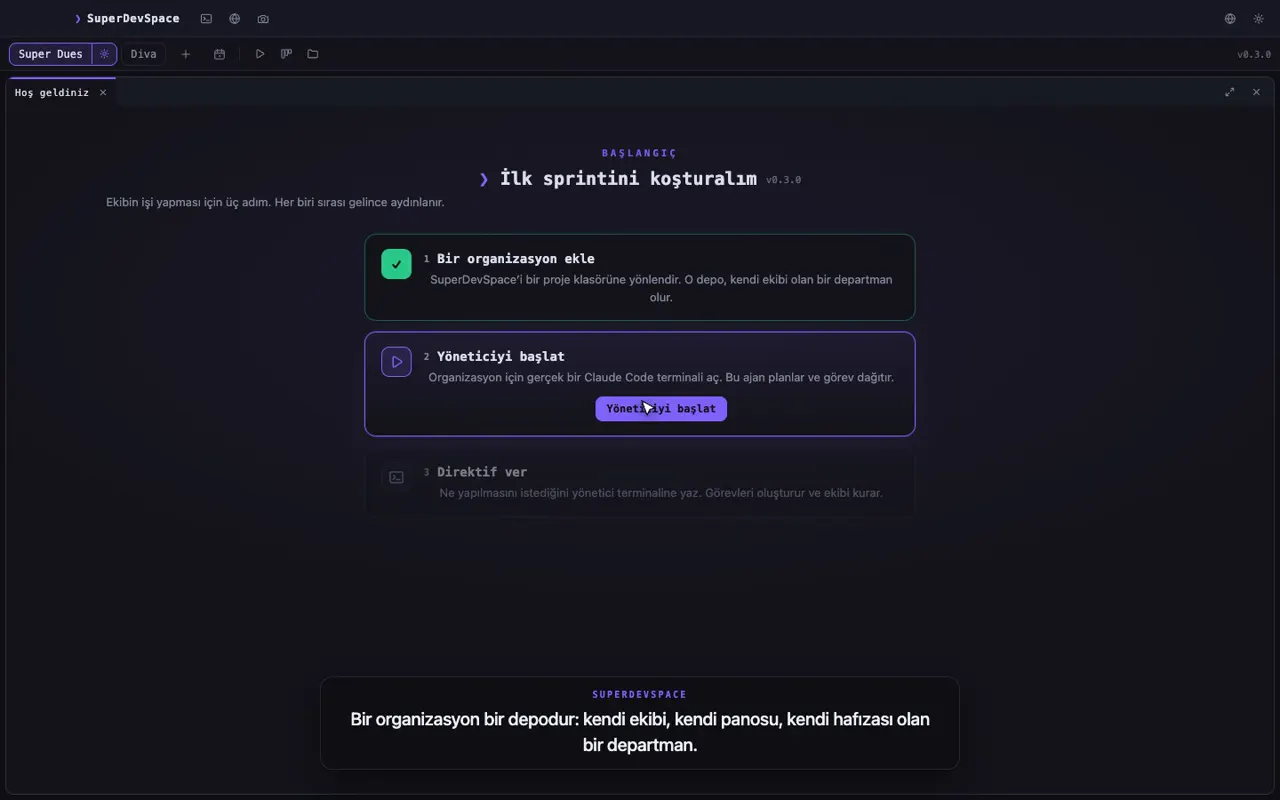
A manager opens the sprint, splits it into tasks and hires workers. Every worker gets its own terminal and its own git worktree, and you steer from the desk or from your phone. We do not sell models or tokens — we sell the orchestra.
14 days of Premium, no card. Your CLI subscription stays yours.
Claude Code is the one the app speaks fluently today — hooks, resume, MCP, permission answers. The other six launch and run; the app marks them experimental and tells you which extras are not wired yet, instead of failing silently.
How a directive travels
The loop the app runs all day: you say what you want, the manager plans it, workers build it in parallel, and every change comes back as a diff you can review.
Manager
Sprint S-12
To do
In progress
T-103
FAQ copy
Review
T-102
Yearly toggle
Done
T-101
Pricing cards
worker-1 · Claude Code
src/sections/Pricing.astro
@@ -14,6 +14,11 @@ <article class="plan"> <p class="price">{plan.monthly}</p> <p class="price" data-period={period}> {period === "yearly" ? plan.yearly : plan.monthly} </p> <BillingToggle bind:period /> </article>An illustration of the real flow. The recordings further down are the real app.
How it works
Type what you want in plain language — "ship the landing page", "find the flaky test". No task syntax to learn.
The manager opens a sprint, writes briefs and hires the workers it needs. Each one gets its own git worktree, so nobody edits over anyone.
Reports land on the board saying what was verified and what failed. Approve, redirect or merge — from the desk or from your phone.
Features
Every plan gets the full workspace. Premium adds the pieces that reach further: more machines, design, and work on a schedule.
Every worker runs in its own git worktree and its own terminal. Parallel work on one repository without a single "your branch has diverged".
Choose the CLI each organisation runs on. The app says exactly what is wired for each one instead of failing quietly.
Click an element in your running page and send it to an agent with the component, file and line attached. Vite, Next.js and static sites.
Talk to any agent in a chat, or drop into its real terminal. One session, two views of it.
Every change appears as a diff next to the conversation that made it, so you review it before it reaches your main line.
Sprints, tasks, briefs and reports. Every report says what failed, not just what passed.
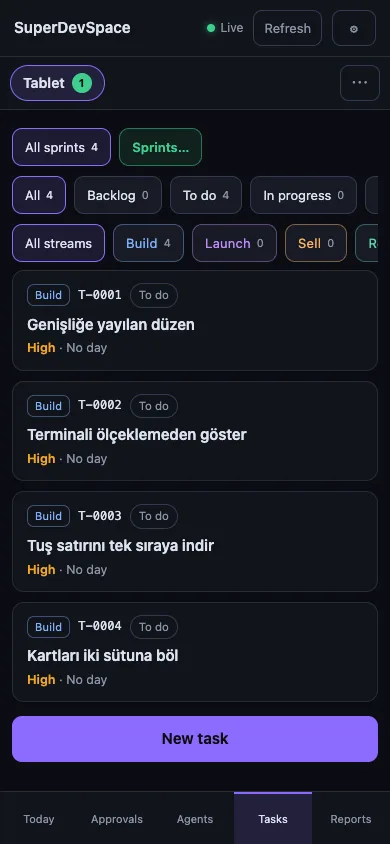
The board, the agents and the approvals in the phone app. Answer a permission prompt from the kitchen.
Dictate a directive instead of typing it — with your own speech key, or fully on-device.
An Excalidraw board per organisation that agents can read and draw on. Sketch the flow, send the selection.
A Penpot design file inside the app, and a Designer agent that draws in it.
Directives on a timetable: a nightly dependency sweep, a Monday triage. They run whether you remember or not.
Pair your own machines. A manager on your Mac hands work to a manager on your Windows PC, and the answer comes home.
Desk and pocket
The desktop app is where the team works. The phone app is how you keep up with it when you are away from the desk.
macOS
Apple silicon
Peer linkPremium
A manager on one of your machines sends work to a manager on another, and the reply comes back as a chat card.
Windows
64-bit
Recorded, not rendered
Everything below was captured from the running product. Each clip opens at full length.
The workspace
A manager, a board, and workers picking tasks up — the whole app in one pass.
Inspector
Pick an element in the browser, send it to an agent with the file and line it came from.
Edit mode
Change copy and spacing in the running page; the agent writes it back into the source.
Tests, off your screen
The end-to-end suite runs on a second monitor and never steals your keyboard.
Why this is different
We never resell tokens and never proxy your prompts. You bring the CLI you already pay for; we orchestrate it. Your usage stays on your account, at your rate.
Source, prompts, terminal output and repository paths are never sent to us. The account service holds an identity, a subscription and a device list — nothing else. This is a rule with a test behind it, not a slogan.
The app works without us. A signed licence token is cached for 7 days of offline use, and when it lapses nothing locks: running agents keep running, only new organisations and new agents pause.
Pricing
One subscription per person. Your agent CLI is billed by its own provider, never by us.
Founders offer: 50% off for life for our first 100 customers
For one developer and one main machine.
$19/month
$190/year
Billed monthly, cancel any time
Billed yearly — 2 months free
For several projects across several machines.
$39/month
$390/year
Billed monthly, cancel any time
Billed yearly — 2 months free
No organisation or agent limit, and first in line.
$79/month
$790/year
Billed monthly, cancel any time
Billed yearly — 2 months free
14 days of Premium free, no card. Then pick the plan that fits.
| Compare the plans | Pro | Premium | Diamond |
|---|---|---|---|
| Organisations | 2 | 10 | Unlimited |
| Concurrent agents | 3 | 10 | Unlimited |
| Devices | 2 | 5 | 10 |
| Peer link (Mac ↔ Windows) | Not included | Included | Included |
| Design mode (Penpot) | Not included | Included | Included |
| Schedules | Not included | Included | Included |
| Priority support | Not included | Not included | Included |
| Early access to new features | Not included | Not included | Included |
| Your choice of seven agent CLIs | Included | Included | Included |
| Task board | Included | Included | Included |
| Inspector | Included | Included | Included |
| Chat and terminal per agent | Included | Included | Included |
| Inline diffs | Included | Included | Included |
| Phone app | Included | Included | Included |
| Voice typing | Included | Included | Included |
| Excalidraw whiteboard | Included | Included | Included |
FAQ
Claude Code, OpenAI Codex, Gemini CLI, Aider, Qwen Code, Cursor CLI and OpenCode are all selectable. Claude Code is the one the app speaks fluently today — hooks, resume, MCP, permission answers. The other six start and run; the app marks them experimental and tells you which of those extras are not wired yet instead of failing silently.
Yes, and that is the point. SuperDevSpace drives a CLI you already pay for. We never resell model access, so nothing you run here shows up on a bill from us beyond the subscription itself.
Nowhere. Agents run as local processes on your machine, against your local repositories. Source, prompts, terminal output and file paths are never sent to our servers. Our service stores an account, a subscription state and a device list.
You pick a plan. If you do not, nothing is deleted and nothing stops mid-flight: agents already running keep running, and new organisations and new agents wait until you subscribe.
14 days, no questions asked, and the payment is handled by a merchant of record (Lemon Squeezy or Paddle) so the invoice and tax handling are theirs. The full terms are on the refund page.
Pro covers 2 devices, Premium 5 and Diamond 10. You can see every signed-in device and sign one out remotely at any time.
macOS on Apple silicon and Windows (64-bit). Linux has no date yet, and we will not invent one.
For an account: your e-mail address, subscription state and device records. For the waitlist: your e-mail address, the time you confirmed it and nothing else. Product analytics inside the app are off by default and ask before they turn on. The privacy policy and the KVKK disclosure spell it out.
We are in private beta. Leave your e-mail and you will hear from us once — when SuperDevSpace opens, with the founders offer attached.
14 days of Premium free, no card. Your CLI subscription, your machine, your code.